VR in Education: What It Changes in the Classroom
VR in education means using virtual reality headsets so students can explore, practise and experiment inside immersive 3D environments. Research shows measurable, moderate learning gains. In practice, success depends less on the headsets than on how the session is run: launching content for everyone, seeing what each student does, and ending the lesson on time.

Key takeaways
- The learning gains from VR in education are real but measured: meta-analyses report small-to-moderate positive effects, not miracles.
- What VR is used for depends on the level: career discovery and immersion in secondary school, soft skills and professional practice at university, trade gestures and safety in vocational training.
- The difference between a good VR lesson and a failed one is rarely the content. It is how the session is run.
- School Wi-Fi is a frequent cause of interrupted VR sessions, which is why offline-capable setups and stream control matter.
- A school VR lab needs three decisions: how many headsets, who operates them, and how content gets onto them.
- Institutions such as UniLaSalle Beauvais, IFPEN, CPIFP Corona de Aragón, Jean-François Champollion University, R’volution and Virtual Creation run VR sessions as part of their teaching and training.
Why Schools Adopt VR
Ask a teacher why their school bought headsets and you rarely hear "because it's immersive." You hear practical reasons, and they change with the level:
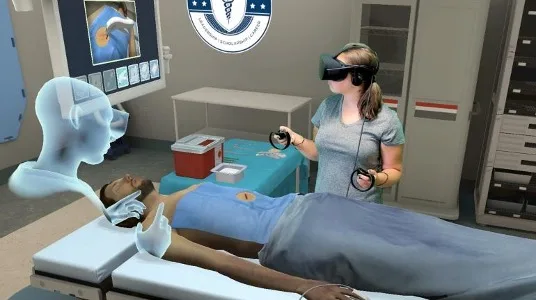
a 14-year-old cannot spend a day on a building site to find out whether the job suits them
a history class cannot walk through a city as it looked a century ago
a nursing student cannot rehearse a mistake on a real patient
an apprentice carpenter should not discover the dangers of a spindle moulder on the real machine
That practical argument is now backed by evidence. Virtual reality in education has been meta-analysed repeatedly, and the results are consistent in direction if not in size.
STEM learning · 2023
63%
of students taught without VR were outperformed by the average VR learner
18 studies · 2,214 participants
Cromley, Chen and Lawrence (2023) combined 18 studies covering 2,214 participants in science, technology, engineering and maths. On average, students who learned with VR outperformed about 63% of those who learned without it.
Elementary school · 2023
74%
of students taught without VR were outperformed by the average VR learner
In elementary schools, Lara-Alvarez and colleagues (2023) found an even clearer gap: the average VR learner outperformed about 74% of their peers.
Nursing education · 2023
- theoretical knowledge
- practical skills
- ✕ critical thinking
In nursing education, Liu et al. (2023) found better theoretical knowledge and practical skills, but no measurable gain in critical thinking: a nuance worth keeping when you write a business case.
The benefits of VR in education are therefore real, but they depend on what you ask it to do.
VR adds the most when students need to see or experience something they otherwise could not (a workplace, a historical site, a structure too small or too large to observe), or to practise something that is expensive, dangerous or hard to repeat (a machine, a clinical procedure, a speech in front of an audience).
It is weak as a general-purpose replacement for a lecture.
Two broader reviews explain why institutions keep investing, and where VR pays off most:
Meta-analysis · 2022 · 48 studies
70%
A 2022 meta-analysis of 48 experimental studies (Coban, Bolat & Goksu) found that learners taught with VR headsets outperformed about 70% of those taught with traditional methods, but had only a slight advantage over learners working on a computer screen: the headset adds most when the activity makes use of it.
For what these meta-analyses measure, and what they leave out, see our analysis of VR training effectiveness.
Systematic review · 2024 · 30 studies
Learn by doing
A 2024 systematic review of 30 studies (Conrad, Kablitz & Schumann) reached the same conclusion from another angle: headset VR works best when learners act (manipulate, build, practise) rather than simply watch.
Add the non-academic savings (no consumables, no travel, no reset between attempts, and a safe place to fail) and the case for a pilot is usually easier to make than the case against it.
How VR Is Used at Each Level of Education
VR is not used the same way in a secondary school, a university and an apprenticeship centre. The age of the learners, the goal of the course and the time available change what a headset is for. Let's see some examples:
Secondary Schools: Discovering Careers, Places and Languages
- Career discovery. In France, Onisep, the national agency for information on education and careers, publishes classroom activities in which students aged roughly 12 to 15 watch 360° videos of real workplaces in a headset, then describe the environment, the tools and the interactions between professionals. The same activity is used to question stereotypes about jobs.
- History and geography. Teachers use 360° images and reconstructions to take a class somewhere it cannot go. A history-geography teacher at Lycée Berthelot in Châtellerault, for example, uses 360° photos to show how a city's streets changed over time. His conclusion: "the paradox is that virtual reality makes the course more concrete" (translated from French).
- Languages. A 2026 meta-analysis of 21 studies and 2,503 learners, from primary school to university, found a moderate positive effect of VR on speaking and writing skills.
- Science. The STEM meta-analysis cited above covered learners from middle school to university: VR is used to observe what cannot be seen in a school lab and to run experiments that would be too costly or too risky.
Universities and Higher Education: Soft Skills and Professional Practice
- Public speaking and soft skills. At Indiana University–Purdue University Indianapolis (IUPUI), students rehearse presentations in Meta Quest headsets with VirtualSpeech: they choose the setting (auditorium, classroom or job interview) and the software tracks pace, filler words and eye contact while the virtual audience reacts.
- Health. In nursing education, VR improves theoretical knowledge and practical skills (Liu et al., 2023, above).
- Engineering and sciences. UniLaSalle Beauvais uses VR sessions across its engineering and earth-science programs, and Jean-François Champollion University integrates VR into its teaching.
Vocational Schools and Apprenticeship Centres: Trade Gestures and Workplace Safety
- Trade gestures. Since January 2026, BTP CFA Picardie, a French construction apprenticeship centre, has used VR simulators on three sites to train apprentice carpenters on four woodworking machines (panel saw, bandsaw, jointer and spindle moulder). The system analyses hand position, respect of safety zones and cutting regularity.
- Workplace safety. CPIFP Corona de Aragón, a vocational training centre in Spain, uses headsets for its industrial and safety modules.
Beyond Schools: Continuing and Professional Training
The same logic extends to adult training. IFPEN, the French energy and mobility research institute, runs immersive training for technical staff, and training providers R’volution and Virtual Creation deliver HSE training in VR (ergonomics, risk awareness, incident response), where the cost of a mistake in the physical world is unacceptable.
“At every level, the common thread is not the technology. It is that someone owns the session.”
What VR Looks Like in a Real Classroom
A virtual reality classroom does not look like a science-fiction film. In most institutions it looks like a normal room with a storage and charging cart at the back, a teacher with a screen, and a lesson that has been rewritten to fit the constraints of a headset.
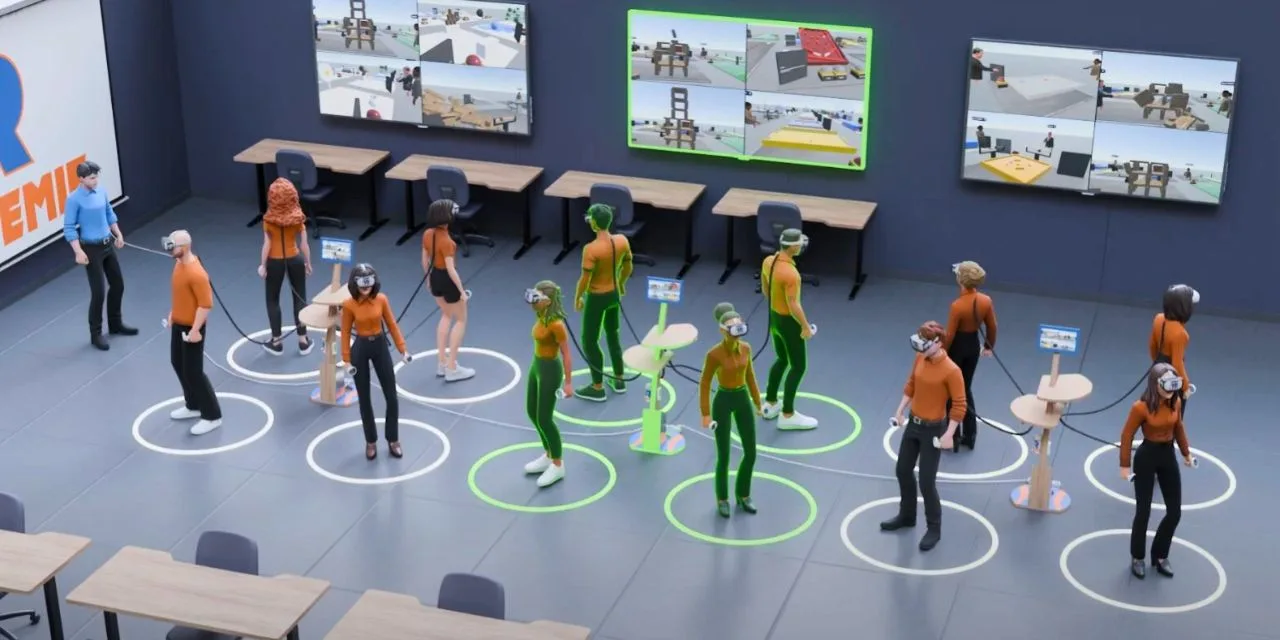
A typical 45-minute session breaks down like this:
- Minutes 0–5briefing without headsets.The task, the controls and the exit signal are explained on screen, not inside the headset. Learners who have never worn a headset get the safety and comfort talk here.
- Minutes 5–10distribution and fitting.Headsets are handed out, IPD adjusted, straps fitted, hygiene wipes used between groups.
- Minutes 10–30the learning block itself.Two patterns dominate. In whole-class sync, everyone runs the same scene at the same time. In individual practice, each learner works at their own pace while the teacher observes from outside.
- Minutes 30–38capture and debrief.The teacher pulls up specific learner views, or stops every headset at once and brings the class back.
- Minutes 38–45collection, charging, storage.This is when a session succeeds or fails quietly. Headsets that go back into the box uncharged are tomorrow's problem.
The Part Nobody Talks About: Managing 16 Headsets in One Room
Most articles about VR in education explain why it helps. Few explain how to run it. That gap is where many school pilots are lost.
Consider the arithmetic
16headsets, one per learner
1adult, the teacher in the room
One adult for sixteen headsets. That is the ratio a school plans around: one person runs the session, whatever the number of devices.
Sixteen learners, sixteen headsets, sixteen operating systems that each want to update, sixteen batteries at different charge levels, sixteen screens the teacher cannot see, and one adult in the room. If your process is "walk around and tap each headset," a large part of the lesson is gone before anyone starts learning.
The operational layer has four jobs:
Getting the same application onto every headset, reliably, without handling sixteen devices one by one.
Starting the session together, so no learner is two minutes ahead of the group and no learner is stuck on a home screen.
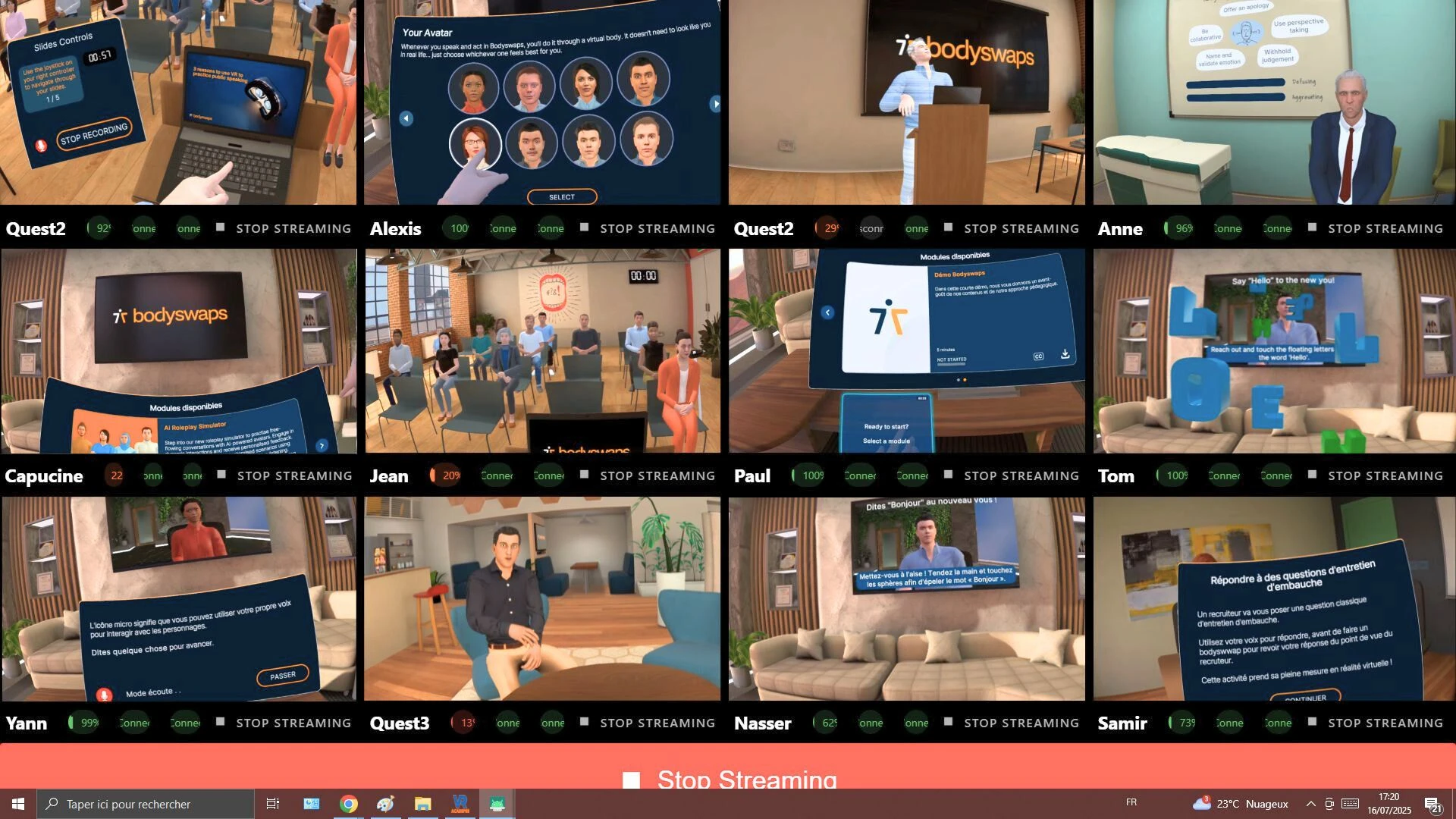
Seeing what learners see, at least on demand, so the teacher can spot confusion without removing a headset.
Ending the session centrally, because "everyone take your headset off" is not a control mechanism.
Doing these four jobs by hand does not scale. Doing them with the wrong tool does not either: which software should do this job is covered further down this page.
Three organisational details make the difference between a lab and a cupboard of dead devices:
A named session owner. Not "the IT department": one person who prepares the cart, checks charge levels and resets content between groups.
A default scenario per course. Ad-hoc content selection is what turns a session into a demonstration.
Supervision software. A monitoring tool to follow what every learner is doing during the session.
Offline-First: Why School Wi-Fi Breaks VR Sessions
School networks are built for laptops and phones browsing documents. They are not built for a class of headsets working at the same moment, and the failure is predictable.
What usually goes wrong:
Access point saturation. Sixteen headsets streaming their screens at the same time can saturate a single Wi-Fi access point, whether the network is connected to the internet or purely local. What matters is the available bandwidth. That is why OmnicastVR includes a bitrate manager: the teacher lowers the weight of each stream to fit the network. Between its highest and lowest bitrate settings, a stream uses five times less target bandwidth, while image quality is only roughly halved. See how many headsets one computer can stream before sizing the classroom setup.
DHCP exhaustion. Guest and student scopes are often sized for turnover, not for devices that need a stable address for an hour.
Network isolation. Guest networks frequently block device-to-device traffic, so the teacher's computer cannot reach the headsets even though both have "internet."
Background updates. A headset that decides to download a system update mid-lesson consumes the bandwidth everyone else needs.
Captive portals and filtering. Firewalls that require web authentication or block non-standard ports can stop a session before it starts.
Content that lives in the cloud. If the training scenario streams from a remote server, a dropped connection means a dropped lesson.
Fixing the school network is possible, but it is a project: usually
- a separate VLAN
- a dedicated access point
- static leases
- a maintenance window
An offline-first setup removes the internet dependency:
- content sits on the headset
- the session runs over a local Wi-Fi connection
- updates are scheduled deliberately rather than discovered
Bandwidth still has to be managed, which is what stream control is for.
A simple test: unplug the building's internet connection and run your VR lesson. If it still works from start to finish, you are safe. If it stops, any network outage can cancel your lesson.
This matters even more in areas with unreliable connectivity, and when you train on a client's site where you have no control over the network.
Choosing Hardware and Software for a School VR Lab
For VR in schools, the hardware conversation should start with the room, not the catalogue.
How many headsets?
Start from the lesson format. Whole-class sync needs one headset per learner; rotations and pair work need fewer. Then check how many headsets one person can realistically distribute, support and collect inside your lesson slot. On the software side, OmnicastVR supervises up to 16 headsets per computer; beyond that, plan for a second computer and a second operator.
Standalone or PC-tethered?
A VR headset for education is almost always a standalone device, because it needs no workstation per learner, no cables to trip over and no dedicated computer lab. Tethered PC-VR remains relevant for high-fidelity simulation in engineering and medicine, but it does not scale to a classroom timetable.
Check before you buy:
- Age and account guidance. Headset makers publish their own minimum ages and account rules; those change, so verify at purchase time rather than trusting a blog post.
- Vendor support for business and education. Meta stopped selling commercial Quest SKUs on February 20, 2026, and announced that its Quest for Business program will shut down on January 4, 2030 (UploadVR). If you plan a multi-year deployment, check which management tools you will rely on (alternatives to Meta Quest for Business).
- Content licensing. A headset without a licensed scenario is a paperweight. Count subscription costs per headset, not per school.
- Optics and comfort. IPD adjustment and glasses compatibility decide whether a 45-minute session is comfortable or a headache.
- Charging and storage. Budget for a cart or cabinet that charges and stores in the same motion.
- Hygiene consumables. Face-interface wipes and replacement covers are a recurring line item.
- Management, in two layers. Decide early whether you need an MDM for the fleet, a session control tool for the lesson, or both.
On the software side, the useful question is not "what content do we have?" but "what happens at minute one of a lesson, and who does it?" Any tool you evaluate should be judged on that.
Choosing Supervision Software: Why a Teacher Doesn't Always Need an MDM
Once the headsets are in the room, the software that runs the lesson matters as much as the content. The instinct is often to buy an MDM, because that is what IT departments know. But an MDM answers IT's questions, not the teacher's. For a lesson, what matters is whether the person in front of the class can see every headset, start and stop the session, and do it without calling anyone.
| MDM (Mobile Device Management) | Session supervision software | |
|---|---|---|
| Question it answers | "Are all our devices enrolled, configured and locked down?" | Are all my learners properly immersed in their VR experience? |
| Main user | IT department | Teacher or trainer |
| Typical features | Enrolment, policies, kiosk mode, app libraries, fleet inventory | Live view of what is happening in every headset, synchronised app launch, one-click stop |
| Set-up | Device enrolment and IT configuration | Installed on one computer, headsets connected |
| Connectivity | Usually cloud-based | Runs on a local Wi-Fi network and/or the internet, as you choose |
The two are complementary, not interchangeable. Organisations with large, multi-site fleets often need an MDM such as ArborXR or ManageXR for the IT lifecycle. A teacher running lessons with a single set of headsets mainly needs supervision. More on the difference in our VR MDM guide.
What to check in supervision software:
- Can a teacher use it on their own, with no IT set-up and no account to create for each student?
- Does it need an agent or app installed on each headset?
- Does it keep working when the internet drops?
- Does it show every headset live, and let you zoom in on one learner?
- Can it launch and stop the same application on all headsets at once?
- Does it work with the headset brands you already own?
- Is it priced per headset or per computer?
OmnicastVR: a remote control for VR lessons, built for trainers, not IT
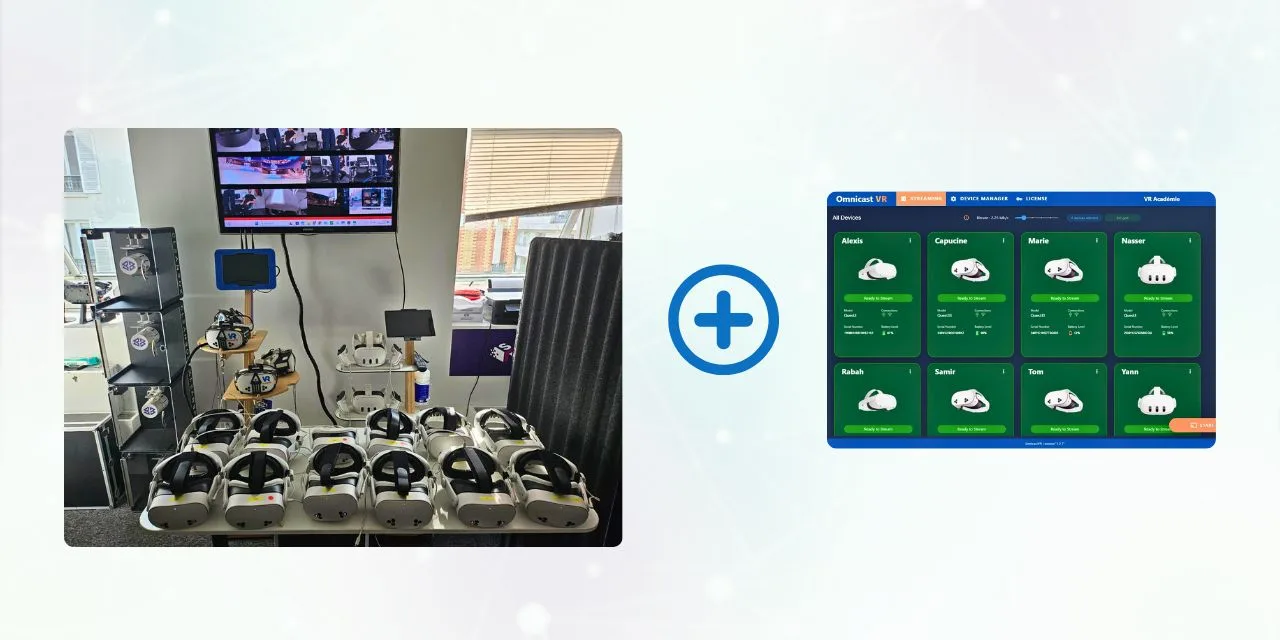
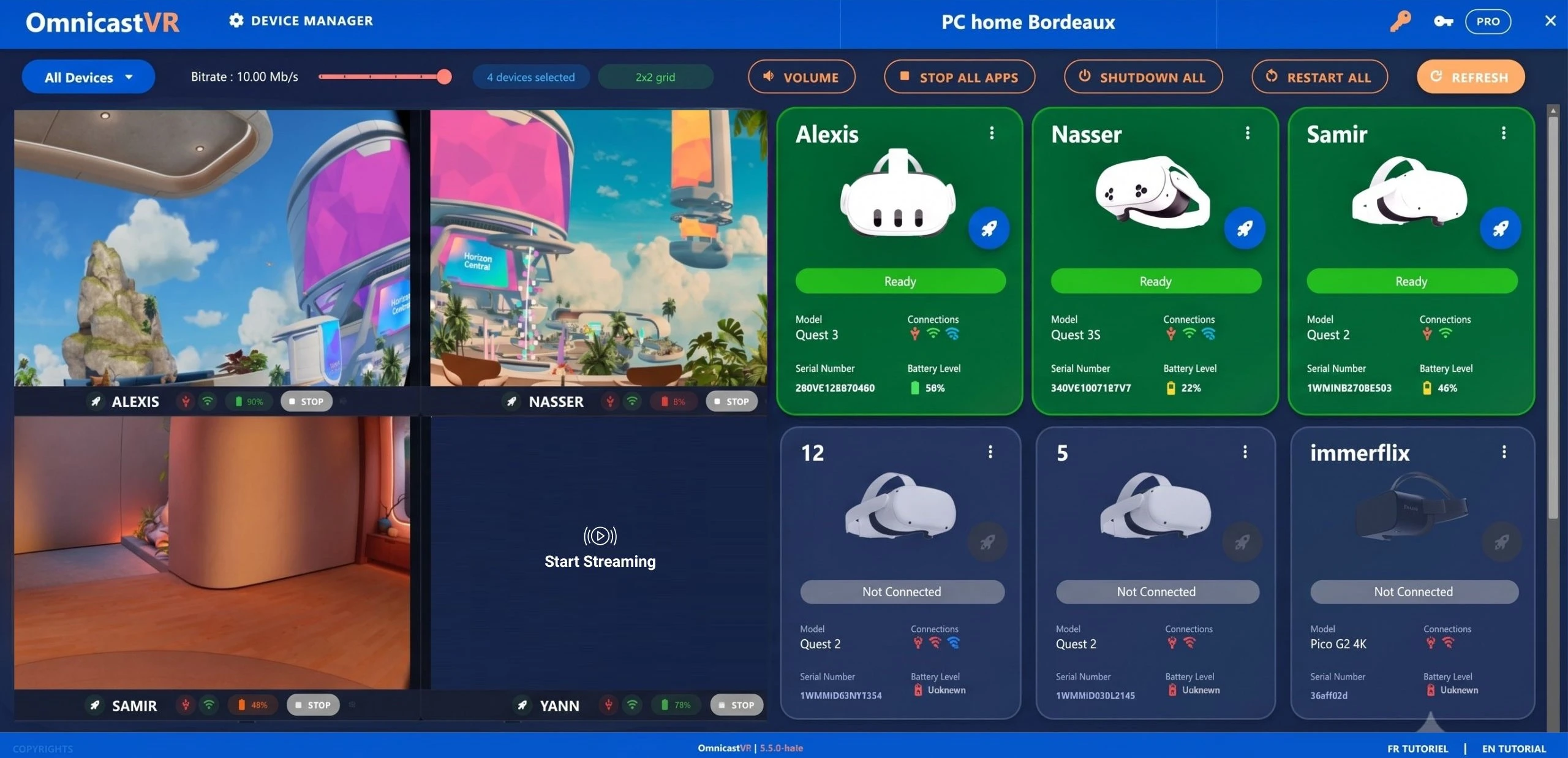
OmnicastVR was designed by a team that runs VR training sessions in the field, for the people who actually lead them. It works like a remote control for the whole class, from one Windows computer:
See: the live screen of up to 16 headsets side by side, with a focus mode to zoom in on one learner.
Launch: install and start the same application on one headset or on all of them at once.
Stop: close all applications, restart or power off every headset in one click.
Keep an eye on the essentials: battery levels and volume, from the computer.
Adapt to the network: the bitrate manager lowers the weight of each stream when bandwidth is tight.
Nothing is installed on the headsets themselves. Meta Quest headsets only need developer mode enabled once. There is no login or password to enter during the lesson. It works over local Wi-Fi, with or without internet, with Meta Quest (2, 3, 3S, Pro), Pico (4, 4 Enterprise, G3) and HTC Vive Focus headsets, including mixed fleets. Licences are priced per computer, never per headset, and a free-forever plan covers 1 to 2 headsets (see plans).
What it deliberately does not do: it is not an MDM. It does not enforce passcodes, kiosk mode or device lockdown. If you need those policies across a large fleet, pair it with an MDM. If you need to run a lesson, it covers the part that matters.
Student Data and Privacy: What to Ask Before You Buy
Before any VR tool enters a classroom, ask three questions: where do headset images go, what student data is required, and where is the vendor's backend hosted.
For OmnicastVR, the answers are:
Where do headset images go?
Images stay local. The software is installed on the school's computer; it is not a cloud streaming service. No video, image or screenshot of the headsets is sent to our servers.
What student data is required?
No student personal data is required to run a session.
Where is the vendor's backend hosted?
Minimal cloud traffic. Only licence activation and verification, plus anonymous usage statistics (number of sessions, streaming time), reach our backend, hosted in the EU (AWS Paris, eu-west-3).
Frequently Asked Questions
Where the operational layer is headed: the schools and training centres that get value from VR are not the ones with the biggest budgets. They are the ones where a named person can start a class of headsets together and end the session with a single click. See how session control works on our features page, compare plans for schools, or download OmnicastVR for free and run your first two-headset session this week.
Sources and further reading
- Cromley, Chen & Lawrence (2023), Meta-Analysis of STEM Learning Using Virtual Reality, Journal of Science Education and Technology. Overall effect: g = 0.33. eric.ed.gov/?id=EJ1374796
- Lara-Alvarez et al. (2023), Effectiveness of virtual reality in elementary school: A meta-analysis of controlled studies, Contemporary Educational Technology. Overall effect: SMD = 0.64. doi.org/10.30935/cedtech/13569
- Liu et al. (2023), Effectiveness of virtual reality in nursing education: a systematic review and meta-analysis, BMC Medical Education. doi.org/10.1186/s12909-023-04662-x
- Coban, Bolat & Goksu (2022), The potential of immersive virtual reality to enhance learning: A meta-analysis, Educational Research Review, 36, 100452. Immersive VR vs traditional methods: g = 0.54. www.sciencedirect.com/science/article/abs/pii/S1747938X22000215
- Conrad, Kablitz & Schumann (2024), Learning effectiveness of immersive virtual reality in education and training: A systematic review of findings, Computers & Education: X Reality. www.sciencedirect.com/science/article/pii/S2949678024000035
- UploadVR (2026), Meta Is Shutting Down Its Quest For Business Program. www.uploadvr.com/meta-is-shutting-down-its-quest-for-business-program/
- Onisep, Découvrir les métiers grâce à la vidéo 360 (Terrains d'Avenir(s)). reso-avenirs.onisep.fr/decouverte-du-monde-professionnel-des-secteurs-et-metiers/decouvrir-les-metiers-grace-aux-technologies-immersives-terrains-d-avenir-s/decouvrir-les-metiers-grace-a-la-video-360
- Café pédagogique (2023), Jordi Colomer : l'histoire-géo en réalité virtuelle. www.cafepedagogique.net/2023/03/17/jordi-colomer-lhistoire-geo-en-realite-virtuelle/
- Şimşek et al. (2026), The effect of virtual reality applications on the development of productive language skills: a meta-analysis, Frontiers in Education. Overall effect: g = 0.538. www.frontiersin.org/journals/education/articles/10.3389/feduc.2026.1782286/full
- Inside Higher Ed (2023), College students improve public speaking with VR technology. www.insidehighered.com/news/student-success/academic-life/2023/07/31/college-students-improve-public-speaking-vr
- BTP CFA Picardie (2026), Innover pour mieux former : la réalité virtuelle au cœur des formations bois. www.btpcfa-picardie.fr/actualite/innover-r%C3%A9alit%C3%A9-virtuelle-simulateur-bois