Installing and Selecting Applications - Omnicast VR Tutorial
Installing and Selecting Applications - Omnicast Tutorials
Orchestrating the deployment of your immersive content and managing installation files often resembles an obstacle course for training organizations. Wasting precious minutes configuring each workstation manually before learners arrive breaks the dynamic of your professional interventions. Mastering the tools to install VR headset applications centralizes your technical processes and secures your workshop launches in 2026. 🚀
In brief: This technical video guide details the operation of the integrated App Installer and App Selector. OmnicastVR allows you to upload your APK files from your control computer and schedule the synchronized opening of your experiences on 16 headsets simultaneously, via a simple local Wi-Fi network.
🔄 How to install VR headset applications and orchestrate launches

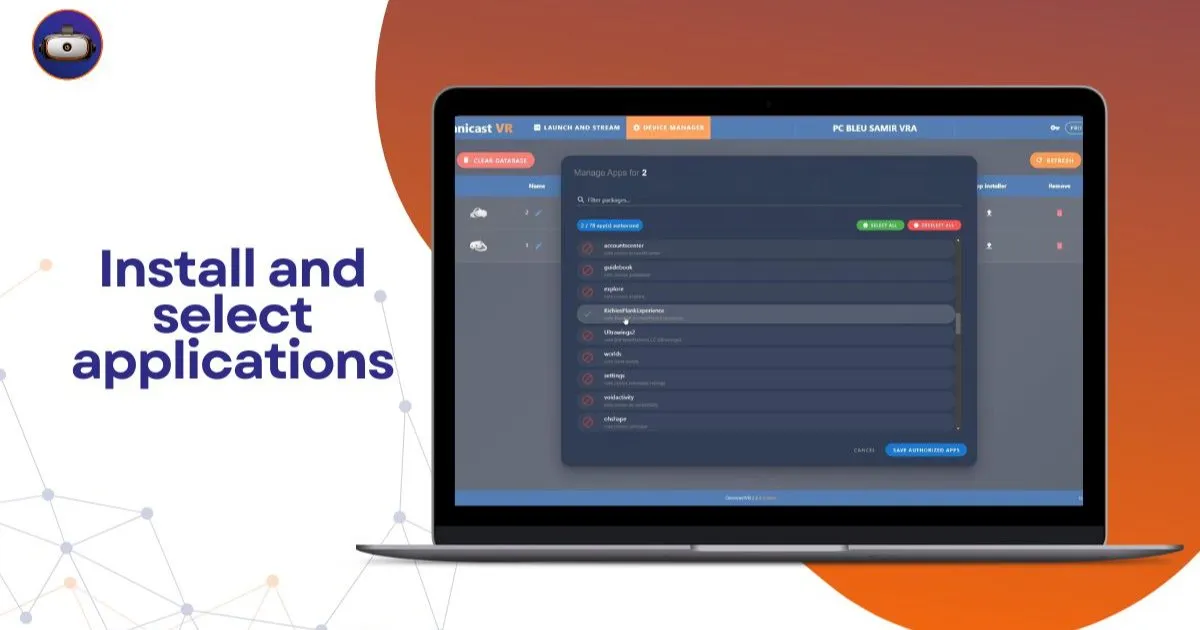
The logistical preparation of your group sessions begins with transferring your application packages (APK files) to your various devices. Thanks to the installation module integrated into our dashboard, you can push your content directly from your supervision computer's hard drive. The system supports local, unitary uploading, ensuring that each device properly receives its file without going through third-party cloud servers.
Once the technical transfer is validated, our interface updates the list of recorded programs detected within the firmware. You can instantly check for your business module (safety, fire, maintenance) to ensure perfect conformity of your configurations. This visual double-check eliminates unpleasant surprises and faulty launches when learners put on their headsets.
How to select and schedule the opening of your modules?
The application selection tool offers total flexibility to structure the progression of your learning paths centrally. You can check one or more specific programs in the list to assign them to your learners' profiles according to the workshop objectives. This unified management avoids letting users navigate blindly through the manufacturers' original home menus.
What is the field VR solution for remote controlling a group of learners?
The strength of our ecosystem lies in its streamlined software architecture, designed for field trainers, not IT. OmnicastVR acts as a true universal remote control to orchestrate all your sessions without requiring any modification to your operating systems. A simple alternative to complex MDMs, the tool provides complete technical autonomy to instructors in the classroom.
📊 Comparison table: VR content catalog management
This table compares the loading and selection steps to measure the agility of our offline protocol:
| Logistical Actions | Cloud Administration Consoles (MDM) | OmnicastVR Local Protocol |
|---|---|---|
| APK Transfer | Web-dependent cloud download | Direct upload from the control PC |
| Synchronized Launch | Subject to internet synchronization latencies | Instant, one-click for the entire fleet |
| Network Constraint | External ports and servers required | Unnecessary (100% closed local Wi-Fi) |
| Hardware Status | Intrusive system overlays installed | Nothing to install on your VR headsets |
| Manufacturer Warranty | Risk of voiding due to OS hijacking | Preserved (Devices remain original) |
This technical comparison demonstrates the efficiency of local content management compared to the slowness of remote web platforms. To understand the installation aspects of our control interface before uploading your files, consult our install and select apps tutorial. To validate the detection of your hardware ports, refer to our developer mode and USB debugging guide.
👁️ Take absolute control of your VR sessions without cloud latency
Bandwidth fluctuations and internet connection drops are the worst nightmare for training organizations on the go. By adopting our sovereign protocol, you isolate your workshops from all external network failures. Control your headsets via a simple local Wi-Fi. Nothing to install on your VR headsets. Stream the screen of your Meta Quest, Pico, and HTC Vive headsets without any constraints.
See the screen of 16 headsets simultaneously
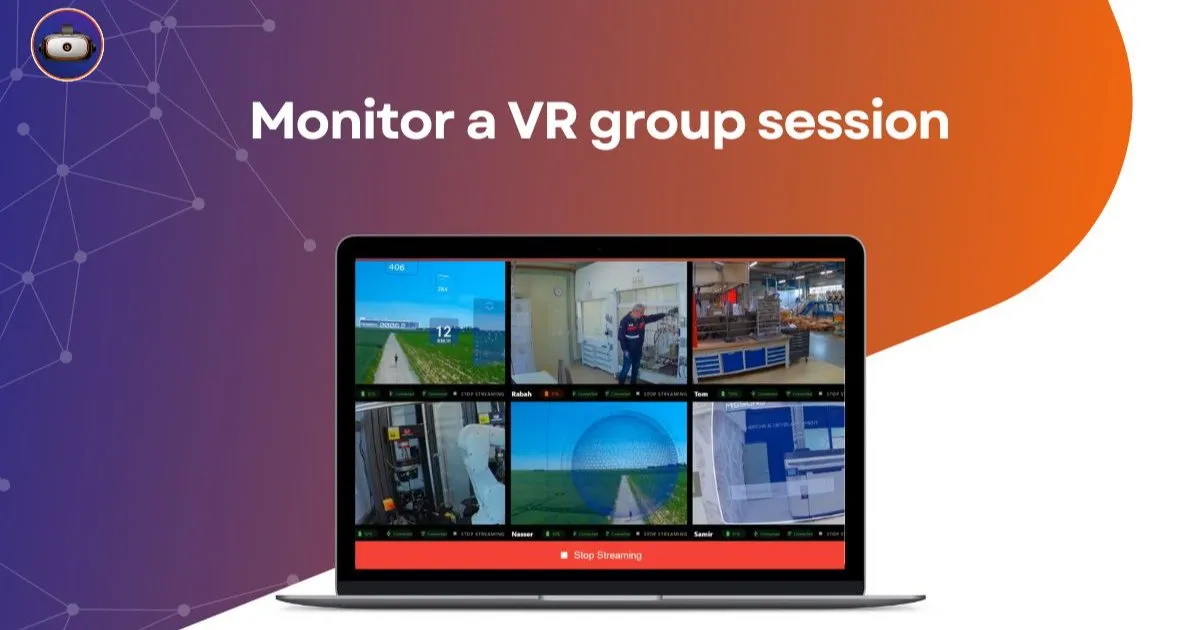
Monitoring your learners is done in real-time thanks to the processing power of our local video stream. You follow each participant's progress within the display mosaic without any lag with their actual movements. See the screen of 16 headsets simultaneously. Ideal for guiding your students without latency and validating the execution of business scenarios.
Control your sessions with a single click
Initiating an exercise no longer requires you to run from one learner to another to press buttons for them. Our centralized selector synchronizes the opening of applications to instantly gather your audience's attention. Control your sessions: launch your apps synchronously and turn off headsets with a single click. Have eyes everywhere. Plug in. Control. Supervise. That's all.
🚀 Secure the logistics of your virtual reality deployments
Freeing yourself from cloud constraints is the strategic choice for operational reliability in your professional training programs. By keeping your streams and application catalogs within a closed local network, you comply with your company's strictest IT security criteria. Your teams approach pedagogical animation with complete peace of mind, valuing your organization's hardware investment.
To deepen your understanding of how to organize your hardware fleets, consult our complete comparative report to find out whether to choose OmnicastVR or an MDM for your VR headsets. Also, explore our support guide to understand how OmnicastVR empowers VR training in businesses. To plan your trainers' equipment, access our OmnicastVR pricing.
❓ Frequently asked questions about VR app management
How to quickly install VR headset applications for a large group?
Use our software's local installation panel to upload your APK file directly from your PC to the headset via a stable physical connection. It's the field VR solution for easily controlling a group of learners while keeping your devices original.
Can different applications be launched on multiple headsets at the same time?
Yes. Our application selection tool allows you to segment your fleet and assign distinct immersive experiences to different subgroups of students. You maintain fluid supervision designed for the field, with visual mosaic feedback on your control screen.
Which hardware brands support local file uploading?
Our proximity control architecture is entirely agnostic and unified for the industrial and educational sectors. You can administer, stream, and launch your applications simultaneously on fleets composed of Meta Quest, Pico, or HTC Vive models without any network restrictions.