Multi-Site VR Software: Manage Your Licenses with Orga Manager
Discover Orga Manager by OmnicastVR. The multi-site management solution to centralize, distribute, and monitor your VR licenses across multiple campuses or subsidiaries
How to Manage Your Virtual Reality Fleet Across Multiple Sites with Orga Manager by OmnicastVR
The deployment of Virtual Reality (VR) technologies in corporate environments and higher education is experiencing unprecedented growth. However, for IT directors, innovation managers, or distributors, managing VR licenses across geographically distant sites has long been a major logistical headache. How do you assign a license to a collaborator located on a different campus or in a regional subsidiary without having physical access to their machine?
To address this specific field challenge, OmnicastVR is upgrading its online activation portal with a major update: the Orga Manager feature. Discover how this innovation simplifies multi-site management for your VR screen casting.
The Challenge of Remote VR Deployment: Overcoming Geographical Barriers
Prior to this OmnicastVR portal update, assigning a software license required physical proximity or complex workarounds if the target computer (the PC connected to the VR headset) was out of the account manager’s reach. For multi-site organizations, centralized management quickly turned into an organizational nightmare.
Whether you are a distributor managing multiple clients or a large corporate group overseeing various regional offices, the need for an agile, cloud-based solution to segment and distribute access rights remotely was undeniable. It is now a reality.
Orga Manager: Structure Your License Console to Match Your Organization
The new Orga Manager feature allows you to create custom subdivisions within your OmnicastVR master account. This enables you to map your administrative interface directly onto your organizational structure:
In the Education Sector: Create distinct spaces for your different campuses, faculties, or research labs.
In the Corporate Sector: Segment management by Business Units (BUs), regional subsidiaries, or countries.
Within a Single Company: Divide administration by autonomous departments (R&D, HR, Training, Marketing).
This strict categorization guarantees perfect isolation and absolute clarity in the distribution of your software assets.
How Multi-Site Management Works on the OmnicastVR Portal
True to our core philosophy, the user experience has been simplified to the maximum to ensure immediate adoption by your IT and management teams.
1. Set Up and Customize Your Sub-Organizations
From your central console, you can create new sub-entities in just a few seconds. To facilitate visual navigation, the portal allows you to upload a dedicated image or logo for each created subdivision.
2. Intuitively Invite Local Collaborators
No more manual profile configurations. Simply enter the email address of your local site leads or IT technicians. They will receive an automated invitation and, upon registration, will be instantly integrated and mapped to the correct sub-organization.
3. Fluid and Independent License Transfers
As a Master Administrator, you purchase your licenses in bulk at the global level, then "switch" them with a single click into the respective sub-organization wallets. Local managers can then immediately activate them on the end-user's PC.
Monitoring and KPIs: A Strategic Tool for Tracking Your ROI
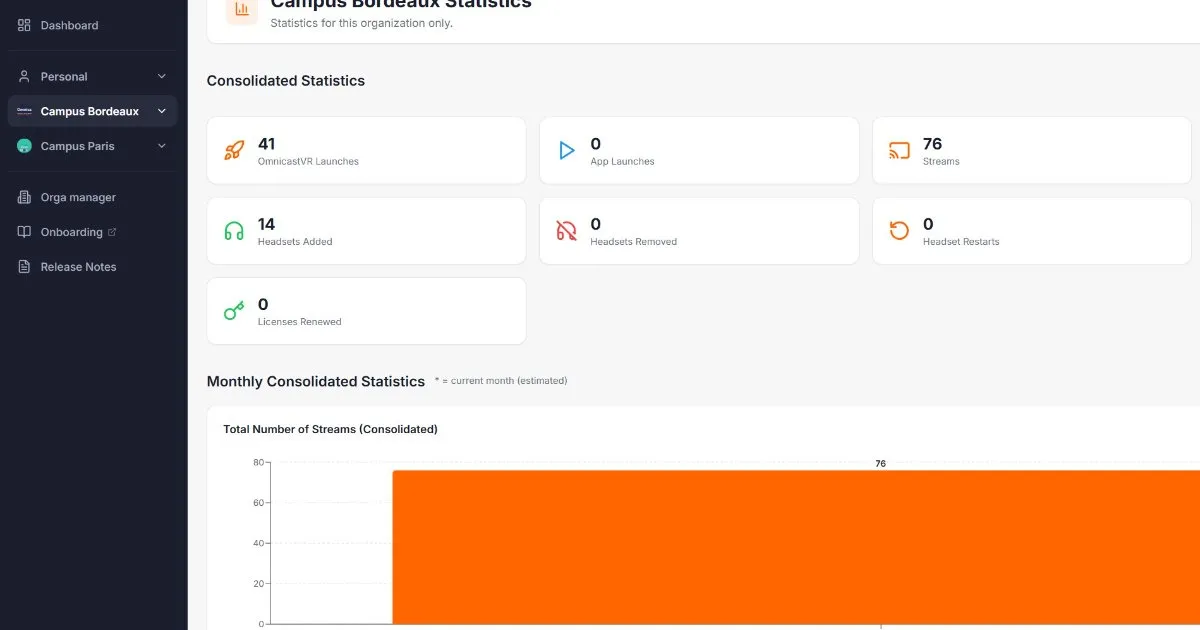
Orga Manager does not just distribute access; it serves as a powerful monitoring tool for your virtual reality fleet. The activation portal now centralizes valuable data for fleet managers:
Real-Time Inventory and Fleet Mapping
At a glance, you know exactly which machines are registered, which licenses are active, and where they are located. No more lost or under-utilized licenses.
Local and Consolidated Usage Statistics
To measure the effectiveness of your VR deployments, the portal generates accurate usage reports by sub-organization (number of video streams initiated, average streaming duration, activity rates). You benefit from both a micro-view (per subsidiary) and a macro-view (consolidated group-wide data) to accurately evaluate technological adoption and Return on Investment (ROI).
A Growth Lever for VR Distributors and Integrators
This update represents a major commercial and operational asset for virtual reality solution distributors. If you manage the procurement and deployment of OmnicastVR on behalf of your clients, you can now create dedicated, secure sub-organizations for each end-customer.
Thanks to this system, your client can receive their hardware on-site, download Omnicast, and install it completely on their own. They instantly benefit from the 30-day free trial version, giving you plenty of time to remotely allocate and activate their permanent license directly onto their machine.
Preserving the DNA of OmnicastVR: Simplicity on the Ground Above All
While license management gains significant power and configuration granularity, the software's usability on the ground remains completely unchanged. OmnicastVR retains everything that has built its strong reputation among users: no password required on-site, no tedious login credentials to enter to launch a session, and seamless compatibility with Mobile Device Management (MDM) solutions.
With Orga Manager, make life easier for your systems administrators while maintaining a completely seamless user experience for your trainees and employees.
Ready to scale up your multi-site VR fleet management? Log in today to your
❓ Frequently Asked Questions (FAQ)
How does VR license validation work across remote sites?
Initial license distribution and assignment are handled remotely via the cloud-based Orga Manager portal. On the ground, OmnicastVR runs autonomously on a local Wi-Fi network without requiring an active internet connection to cast headset streams to control screens. To verify user rights and security, the software simply requires a brief internet connection once every 30 days to automatically check its license status.
Can a distributor assign OmnicastVR licenses to third-party clients?
Yes. With the Orga Manager module on the OmnicastVR portal, a VR distributor or integrator can create completely separate and secure sub-organizations for each client. This allows them to allocate licenses remotely and track global usage statistics without ever needing physical access to the end-client's computer hardware.
How compatible is OmnicastVR with MDM (Mobile Device Management) tools?
OmnicastVR is designed to integrate seamlessly with standard enterprise VR MDM solutions. The software sets itself apart with ultra-simplified field usage: it requires no passwords or usernames on-site to start streaming, making massive deployments straightforward for large corporations and university campuses.
How can I track the utilization rate of my VR headsets with OmnicastVR?
The activation portal includes a consolidated monitoring tool. Thanks to the Orga Manager update, you can extract detailed usage statistics per sub-organization or subsidiary (number of sessions, total streaming hours), allowing you to precisely track technological adoption and the ROI of your VR equipment.